EasyCheckBoxList
An ASP.NET Core Tag Helper that transforms standard checkbox collections into a modern, user-friendly dropdown with multi-selection support.
ASP.NET Core Ready
Select multiple values using a flexible and modern dropdown interface.
ASP.NET Core Ready
Supports MVC and Razor Pages with seamless model binding.
Customizable
Use built-in styling and scripts or provide your own implementation.
Features
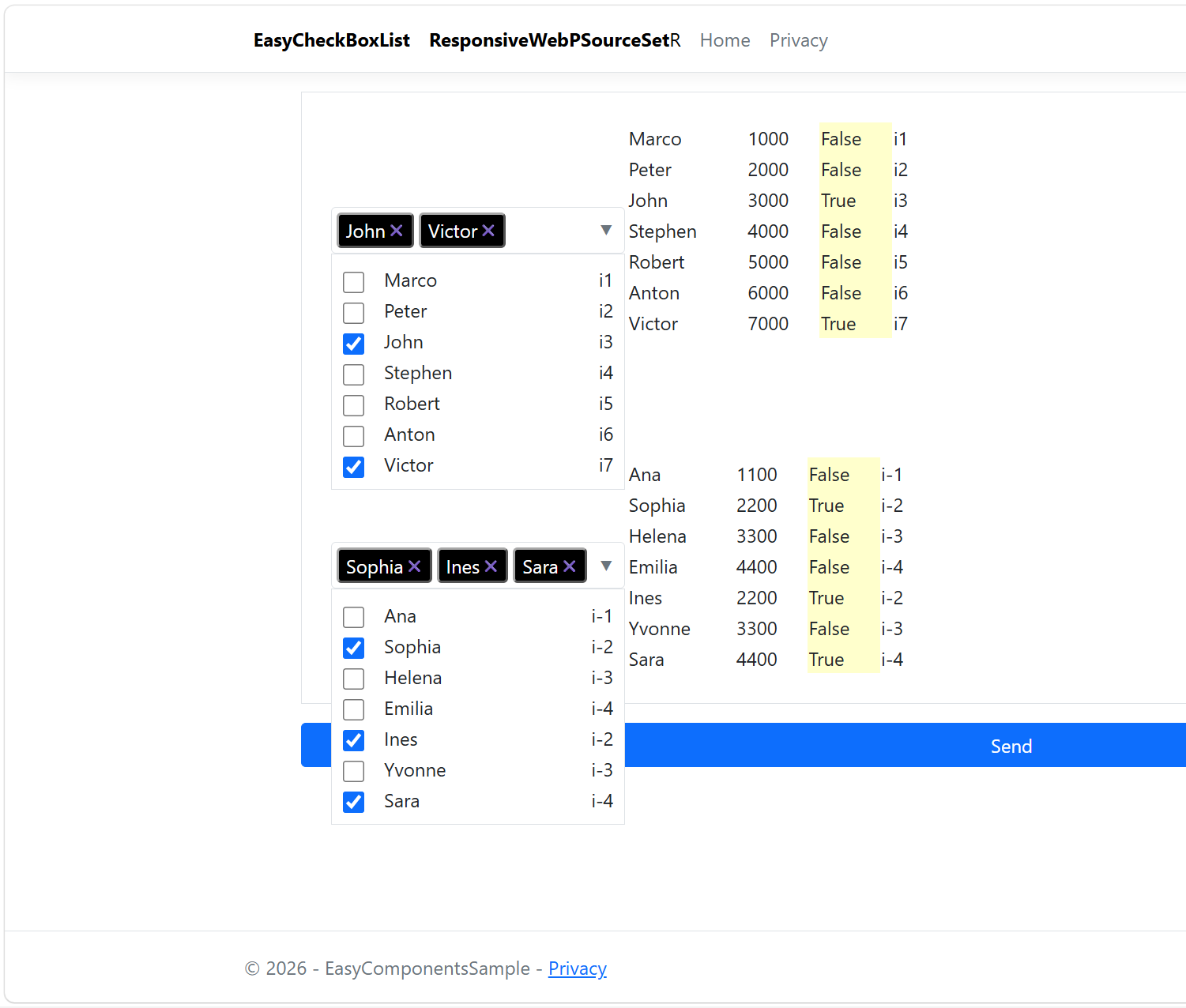
Displays selected items as buttons in the header. Clicking a button removes the corresponding selection.- ✅ Multi-select checkbox dropdown
- ✅ ASP.NET Core MVC support
- ✅ Razor Pages support
- ✅ Bootstrap-friendly appearance
- ✅ Built-in CSS support
- ✅ Built-in JavaScript support
- ✅ Optional custom CSS
- ✅ Optional custom JavaScript
- ✅ Preselected values
- ✅ Additional information column
- ✅ Validation support
- ✅ Easy integration using asp-items
Installation
Install the package from NuGet using the .NET CLI:
dotnet add package EasyCheckBoxListRegistration
Register the Tag Helper in your ASP.NET Core project:
@addTagHelper *, EasyCheckBoxListExample Code
using EasyComponentsSample.Models;
using Microsoft.AspNetCore.Mvc;
using Microsoft.AspNetCore.Mvc.RazorPages;
namespace EasyComponentsSample.Pages
{
    public class EasyCheckBoxListModel : PageModel
    {
        public EasyCheckBoxListModel()
        {

        }

        [BindProperty]
        public TestModel testModels { get; set; } = new();


        public async Task OnGetAsync()
        {
            var list1 = new List();
            list1.Add(new TestModel1 { Name_1 = "Marco", Value_1 = "1000", Info_1 = "i1", Checked_1 = false });
            list1.Add(new TestModel1 { Name_1 = "Peter", Value_1 = "2000", Info_1 = "i2", Checked_1 = false });
            list1.Add(new TestModel1 { Name_1 = "John", Value_1 = "3000", Info_1 = "i3", Checked_1 = false });
            list1.Add(new TestModel1 { Name_1 = "Stephen", Value_1 = "4000", Info_1 = "i4", Checked_1 = false });
            list1.Add(new TestModel1 { Name_1 = "Robert", Value_1 = "5000", Info_1 = "i5", Checked_1 = false });
            list1.Add(new TestModel1 { Name_1 = "Anton", Value_1 = "6000", Info_1 = "i6", Checked_1 = false });
            list1.Add(new TestModel1 { Name_1 = "Victor", Value_1 = "7000", Info_1 = "i7", Checked_1 = false });

            var list2 = new List();
            list2.Add(new TestModel2 { Name_2 = "Ana", Value_2 = "1100", Info_2 = "i-1", Checked_2 = false });
            list2.Add(new TestModel2 { Name_2 = "Sophia", Value_2 = "2200", Info_2 = "i-2", Checked_2 = false });
            list2.Add(new TestModel2 { Name_2 = "Helena", Value_2 = "3300", Info_2 = "i-3", Checked_2 = false });
            list2.Add(new TestModel2 { Name_2 = "Emilia", Value_2 = "4400", Info_2 = "i-4", Checked_2 = false });
            list2.Add(new TestModel2 { Name_2 = "Ines", Value_2 = "2200", Info_2 = "i-2", Checked_2 = false });
            list2.Add(new TestModel2 { Name_2 = "Yvonne", Value_2 = "3300", Info_2 = "i-3", Checked_2 = false });
            list2.Add(new TestModel2 { Name_2 = "Sara", Value_2 = "4400", Info_2 = "i-4", Checked_2 = false });

            testModels.List1 = list1;
            testModels.List2 = list2;
        }

        public async Task OnPostAsync(string? action)
        {
            var actuel = testModels;
        }
    }
}
Example Model
namespace EasyComponentsSample.Models
{
    public class TestModel1
    {
        public string Name_1 { get; set; } = string.Empty;
        public string Value_1 { get; set; } = string.Empty;
        public string Info_1 { get; set; } = string.Empty;
        public bool Checked_1 { get; set; }
    }
    public class TestModel2
    {
        public string Name_2 { get; set; } = string.Empty;
        public string Value_2 { get; set; } = string.Empty;
        public string Info_2 { get; set; } = string.Empty;
        public bool Checked_2 { get; set; }

    }
    public class TestModel
    {
        public List List1 { get; set; } = new();
        public List List2 { get; set; } = new();
    }
}
Basic
@page
@model EasyCheckBoxListModel
@addTagHelper *, EasyCheckBoxList


                            <check-box-combo asp-items="testModels.List1"
                                             add-css="true"
                                             add-javascript="true"
                                             column-name="Name_1"
                                             column-value="Value_1"
                                             column-checked="Checked_1"
                                             column-info="Info_1"
                                             asp-title="Example 1">
                            </check-box-combo>
View: Two EasyCheckBoxList Controls with a Table
@page
@model EasyCheckBoxListModel
@addTagHelper *, EasyCheckBoxList

<main>
    <form method="post" id="f1">
        <div class="row mx-5 border">
            <div class="col-md-6 p-4">
                <table>
                    <tr>
                        <td style="width:250px">
                            <check-box-combo asp-items="testModels.List1"
                                             add-css="false"
                                             add-javascript="false"
                                             column-name="Name_1"
                                             column-value="Value_1"
                                             column-checked="Checked_1"
                                             column-info="Info_1"
                                             asp-title="Example 1">
                            </check-box-combo>
                        </td>
                        <td style="width:250px">
                            <table style="width:100%">
                                @foreach (var item in Model.testModels.List1)
                                {
                                    <tr>
                                        <td>@item.Name_1</td>
                                        <td>@item.Value_1</td>
                                        <td style="background-color:#ffc">@item.Checked_1</td>
                                        <td>@item.Info_1</td>
                                    </tr>
                                }
                            </table>
                        </td>
                    </tr>

                    <tr>
                        <td style="width:250px; padding-top:100px">
                            <check-box-combo asp-items="testModels.List2"
                                             add-css="false"
                                             add-javascript="false"
                                             column-name="Name_2"
                                             column-value="Value_2"
                                             column-checked="Checked_2"
                                             column-info="Info_2"
                                             asp-title="Example 2">
                            </check-box-combo>
                        </td>
                        <td style="width:250px; padding-top:100px">
                            <table style="width:100%">
                                @foreach (var item in Model.testModels.List2)
                                {
                                    <tr>
                                        <td>@item.Name_2</td>
                                        <td>@item.Value_2</td>
                                        <td style="background-color:#ffc">@item.Checked_2</td>
                                        <td>@item.Info_2</td>
                                    </tr>
                                }
                            </table>
                        </td>
                    </tr>
                </table>
            </div>
        </div>
        <div class="row bg-primary-subtle pt-3 align-items-center mx-5 mb-3">
            <button type="submit" class="btn btn-primary me-2 px-3">
                Send
            </button>
        </div>
    </form>
</main>

<link href="~/css/easycheckboxlist.css" rel="stylesheet" />
<script src="~/js/easycheckboxlist.js"></script>
| Attribute | Description |
|---|---|
| asp-items | List of items containing the following properties: Name, Value, Checked, Info. |
| add-css |
Use add-css="true" to automatically include the stylesheet, or manually include ~/css/easycheckboxlist.css and set add-css="false".
If multiple EasyCbList controls are used on the same page, the stylesheet should be included only once, either by using add-css="true" for a single control or by manually including ~/css/easycheckboxlist.css once. |
| add-javascript |
Use add-javascript="true" to automatically include the script, or manually include ~/js/easycheckboxlist.js and set add-javascript="false".
If multiple EasyCbList controls are used on the same page, the script should be included only once, either by using add-javascript="true" for a single control or by manually including ~/js/easycheckboxlist.js once. |
| column-name | Name of the property used as display text. |
| column-value | Name of the property used as value. |
| column-checked | Name of the property indicating the selected state. |
| column-info | Name of the property used as additional information. |
| asp-title | Title displayed above the control. |
Requirements
- .NET 8 or later
- ASP.NET Core